


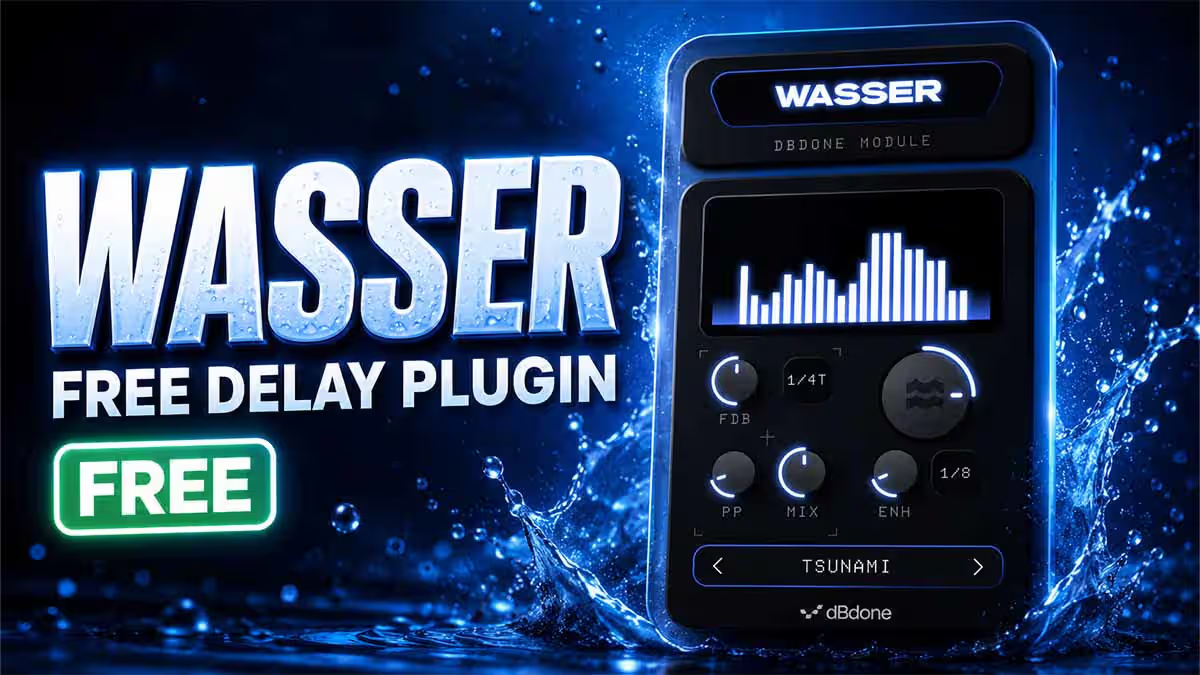
Wasser by dBdone: FREE Multiband Delay Plugin That Lets You Draw Your Delays

If regular delay plugins are starting to feel predictable, Wasser by dBdone takes a very different approach. Wasser is a free multiband delay plugin that lets you create rhythmic delay patterns by drawing different delay times across the frequency spectrum.
Instead of applying the same delay to your entire signal, Wasser can delay different frequency bands by different amounts. This makes it possible to transform drums, percussion, basslines and loops into complex rhythmic textures without building complicated effect chains.
- 100% free audio effect plugin
- Multiband frequency-based delay processing
- Visual draw-style delay editor
- 20 factory presets
- Tempo-synced delay grid
- Wetness and Enhance controls
- Master delay with feedback
- Ping-pong delay functionality
- VST3, AU and AAX plugin formats
- Windows and macOS support
What Is Wasser by dBdone?
Wasser is a creative delay effect built around the idea of applying different delay times to different parts of the frequency spectrum.
With a traditional delay, the complete signal is usually delayed by the same amount. Wasser separates the concept into frequency bands and gives you visual control over how late each band should arrive.
The result is somewhere between a traditional delay, a multiband processor and a rhythmic sound-design tool.
Draw Delay Times Across the Frequency Spectrum
Wasser's biggest feature is its visual delay grid. Each bar represents a frequency region, and the height of that bar determines how much that particular part of the signal is delayed.
For example, you could keep the low frequencies completely untouched while gradually increasing the delay toward the higher frequencies. A single drum hit can then turn into a cascading sequence of frequency-dependent echoes.
You can also create stepped patterns, slopes and irregular shapes to generate completely different rhythmic results.
Keep Your Kick Tight While Delaying Everything Else
One of the most useful applications of multiband delay processing is keeping important low-frequency information stable.
Instead of delaying an entire drum loop and potentially weakening the groove, you can leave the low-frequency bands at the bottom of Wasser's grid while delaying the mids and highs.
This can help you:
- Keep kick drums tight and centered
- Create movement in hi-hats and percussion
- Add rhythmic echoes without making the low end messy
- Turn simple loops into more complex patterns
- Create unusual stereo movement
Tempo-Synced Delay Grid
Wasser uses a grid-based timing system that makes it easy to create delay patterns synchronized with your project tempo.
Once a timing division is selected, moving a frequency bar upward adds additional delay steps to that band. This visual workflow makes it possible to build rhythmic patterns without constantly typing delay values manually.
It can be especially useful when experimenting with breakbeats, electronic drums, percussion loops and other rhythm-focused material.
Wetness and Enhance Controls
Wasser provides straightforward controls for managing how strongly the multiband delay affects your source.
Wetness
The Wetness control adjusts the balance between the original audio and the delayed frequency bands.
Lower values can create subtle movement, while heavier settings can transform the source into a much more obvious rhythmic effect.
Enhance
The Enhance control helps bring forward the processed signal, particularly when only a smaller number of frequency bands are being delayed.
Master Delay, Feedback and Ping Pong
Wasser doesn't stop at frequency-dependent delays. It also includes a master delay section that can process the resulting signal further.
This section includes feedback and ping-pong delay, giving producers another layer of control for creating evolving stereo echoes.
Combining the frequency grid with the master delay can create much more complex patterns than a conventional single-delay effect.
20 Factory Presets Included
Wasser includes 20 presets, which makes it easy to hear what the plugin can do before designing your own patterns.
Presets can also provide a useful starting point. Choose a pattern that is close to the effect you want and then modify the frequency bars until it works with your track.
Users can also create and save their own presets for future projects.
Best Sounds to Use With Wasser
Wasser can technically be experimented with on many different sources, but its frequency-based rhythmic processing makes it especially interesting on material with clear transients and gaps between sounds.
Try Wasser on:
- Drum loops
- Breakbeats
- Percussion
- Hi-hats
- Claps and snares
- Basslines
- Short synth sequences
- Plucks
- Rhythmic samples
- Experimental sound-design material
Creative Ways to Use Wasser
1. Transform a Basic Drum Loop
Draw different delay amounts across the upper frequencies while leaving the bass frequencies untouched. This can create extra movement without destroying the original kick pattern.
2. Create Cascading Percussion
Draw a rising slope across the frequency grid. Different frequency regions will arrive progressively later, turning short percussion hits into cascading textures.
3. Build Glitchy Rhythms
Use irregular shapes across the delay grid to create unpredictable rhythmic movement from otherwise simple loops.
4. Create Stereo Movement
Combine Wasser's multiband processing with the ping-pong master delay to spread echoes across the stereo field.
5. Resample the Results
Process a simple loop through Wasser, record the result and chop the processed audio into completely new samples for further production.
Wasser System Requirements and Plugin Formats
| Developer | dBdone |
|---|---|
| Plugin | Wasser |
| Type | Multiband Delay / Creative Delay |
| Price | Free |
| Formats | VST3, AU, AAX |
| Operating Systems | Windows and macOS |
| Factory Presets | 20 |
Who Should Try Wasser?
Wasser should be particularly interesting for electronic producers, beatmakers, experimental producers and sound designers who enjoy effects that can generate ideas rather than simply process audio.
Producers working with hip-hop, trap, EDM, techno, house, drum & bass, lo-fi, experimental electronic music and cinematic sound design could all find creative applications for its unusual multiband workflow.
It is also simple enough to use as a quick creative tool. You don't necessarily need to understand complex multiband processing—you can simply draw a pattern and listen to the result.
Is Wasser Worth Trying?
Wasser stands out because it doesn't simply recreate another standard delay interface. The ability to visually distribute delay times across different frequency regions gives it a distinctly different workflow.
Keeping one part of the frequency spectrum dry while sending another part through rhythmic delays opens up plenty of possibilities for drums, loops and experimental processing.
Add the 20 presets, tempo-based grid, Wetness and Enhance controls, feedback and ping-pong processing, and Wasser becomes a surprisingly capable creative effect for a free plugin.
Final Thoughts
dBdone Wasser is a refreshing take on the traditional delay plugin. Rather than treating your audio as one complete signal, Wasser lets you sculpt the timing of individual frequency regions using a simple visual grid.
Whether you're looking to add subtle movement to percussion or completely transform a drum loop into a cascading rhythmic texture, Wasser offers plenty of room for experimentation.
For producers searching for a free VST delay plugin, a free multiband delay, or simply a new effect for creative sound design, Wasser is definitely worth checking out.
Frequently Asked Questions
Is Wasser by dBdone free?
Yes. Wasser is available as a free plugin without a trial period or paid feature restrictions.
What does Wasser do?
Wasser is a multiband delay that allows different frequency regions of an audio signal to be delayed by different amounts using a visual drawing grid.
Is Wasser available for Windows?
Yes. Wasser supports Windows systems through compatible plugin formats.
Does Wasser work on macOS?
Yes. Wasser is also available for macOS.
Which plugin formats does Wasser support?
Wasser is available in VST3, Audio Unit (AU) and AAX formats.
Is Wasser good for drums?
Drums, percussion and rhythmic loops are some of the most suitable sources for Wasser because the frequency-dependent delays can create additional rhythmic movement while leaving selected frequency bands untouched.
Product and download reference
Wasser by dBdone – FREE Multiband Delay Plugin — reference at dbdone.com. Check the destination for current versions, compatibility, licence, price and any registration requirements. A reachable page is not a guarantee that a past offer is still free.