
This Free 3-Knob Filter Plugin Makes Transitions Sound Cleaner in Seconds
You’re building up to a drop. The melody is rising. The drums are about to hit. The energy is almost there — but the transition still feels flat.
So you open an EQ.
Then automate a low-pass filter.
Then adjust the curve.
Then tweak the resonance.
Then go back and fix the automation because it still doesn’t feel smooth.
That tiny moment before the drop can take way longer than it should.
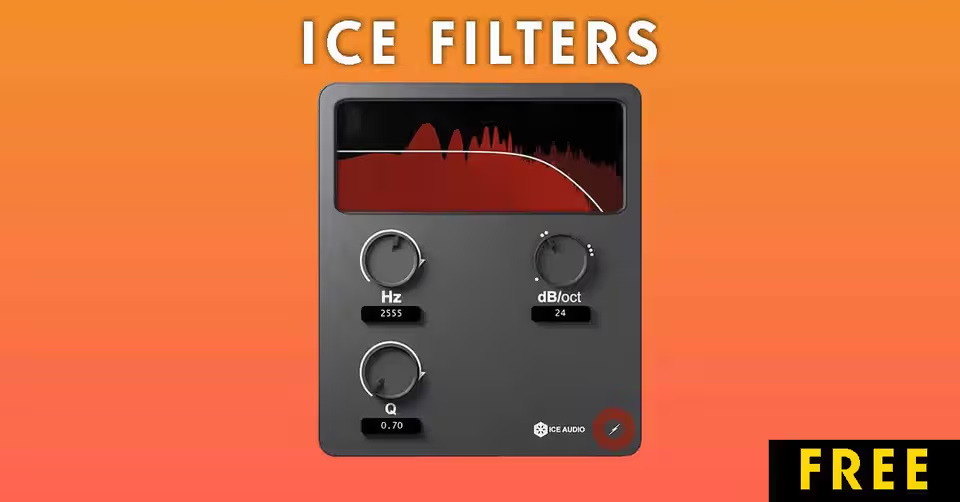
That is exactly why Ice Filter by Ice Audio feels so useful. It is a free auto filter plugin built around one simple idea: give producers a fast way to shape melodies, build-ups, and transitions without getting lost in complicated controls. Ice Audio describes it as a free auto filter made to shape melodies and transitions, with only 3 knobs for controlling the high-cut effect.
And sometimes, that is all a producer really needs.
What Is Ice Filter?
Ice Filter is a free filter plugin from Ice Audio designed for quick high-cut filtering, also known as low-pass filtering.
In simple words, it lets you roll off the high frequencies of a sound. That makes it perfect for:
Build-ups before a drop
Smooth transition effects
Lo-fi and vintage-style sounds
Softening harsh melodies or synths
Creating that “filtered intro” effect used in EDM, house, techno, trap, and pop production
Instead of giving you a huge interface with too many controls, Ice Filter keeps things simple. The plugin is built around 3 knobs, making it easy to move fast and trust your ears.
It is also listed for macOS and Windows, with support for AU, VST3, and AAX plugin formats.
Why Producers Are Paying Attention to It
Most music producers already have EQ plugins. They already have filters. They already have stock tools inside their DAW.
So why does a simple free filter plugin stand out?
Because Ice Filter is not trying to replace your full EQ. It is trying to solve one very specific problem: making filter moves faster and easier.
When you are producing, speed matters. A good idea can disappear if you spend too much time clicking through menus. Ice Filter gives you a quick way to create movement without breaking your creative flow.
That is what makes it interesting.
It is not a “do everything” plugin.
It is a “do this one thing quickly” plugin.
And for transitions, that can be more valuable than having 30 extra controls.
The 3-Knob Idea Is the Real Secret
The biggest strength of Ice Filter is its simplicity.
A lot of modern plugins look impressive, but they also slow you down. You open them, stare at the interface, adjust five parameters, compare settings, and suddenly you are no longer producing — you are troubleshooting.
Ice Filter goes in the opposite direction.
It gives you only what you need to shape a high-cut filter quickly. Ice Audio says the plugin uses “3 knobs to shape this high cut” and calls it “the easiest one to use.”
That makes it beginner-friendly, but also useful for experienced producers who want a fast workflow.
Sometimes the best plugin is not the one with the most features.
It is the one that gets you to the right sound before the idea disappears.
What Can You Use Ice Filter For?
Ice Filter is especially useful when you want movement, tension, or a smoother transition between parts of a song.
Here are some practical ways to use it.
1. Create Smoother Build-Ups Before Drops
This is probably the most obvious use.
Place Ice Filter on a melody, synth, piano, pad, or full music bus. Then automate the filter so the sound slowly opens up before the drop.
That creates the classic “rising energy” effect producers use in EDM, house, techno, future bass, trap, and pop.
The reason this works is simple: when high frequencies slowly return, the listener feels the track opening up. By the time the drop hits, the mix feels bigger and more exciting.
Use it on:
Lead melodies
Chord progressions
Pads
Arps
Vocal chops
Full instrumental groups
A simple filter sweep can make a basic transition feel much more polished.
2. Make Melodies Feel More Professional
Sometimes a melody is good, but it feels too bright or too exposed.
Instead of changing the sound completely, you can use Ice Filter to gently darken it. This helps the melody sit better inside the beat.
This is especially useful for:
Bright synth leads
Sharp piano loops
Harsh sample packs
Plucks with too much top-end
Melodies that fight with vocals
A small high-cut can make a sound feel warmer and less distracting.
You do not always need a complex mixing chain. Sometimes a simple filter move is enough.
3. Add Lo-Fi, Vintage, or Distant Texture
Cutting high frequencies is one of the fastest ways to make a sound feel older, softer, or more distant.
That is why low-pass filtering is common in lo-fi beats, chill music, ambient production, and vintage-style sampling.
With Ice Filter, you can quickly turn a clean sound into something more muted and atmospheric.
Try it on:
Piano loops
Guitar samples
Vinyl-style chords
Vocal textures
Ambient pads
Background melodies
The more you close the filter, the more the sound feels like it is coming from another room, an old speaker, or a dusty sample.
4. Create DJ-Style Filter Sweeps
Filter sweeps are everywhere in DJ sets and electronic music.
They work because they create instant movement. You can use them to transition from one section to another, remove energy before a drop, or create space before introducing a new element.
Ice Filter makes this kind of movement easy because it is focused on quick high-cut shaping.
Use it before:
Drops
Breakdowns
Chorus sections
Beat switches
Verse-to-hook transitions
Outro fades
Even a simple automation curve can make a section change feel more intentional.
5. Clean Up Harsh High-End Quickly
Not every use has to be dramatic.
Sometimes you just need to soften a sound that has too much brightness.
Ice Filter can be used as a quick tone-shaping tool when a sound feels sharp, thin, or uncomfortable in the high end.
This can help with:
Harsh synths
Piercing leads
Overly bright loops
Background textures
Effects that take up too much space
For detailed surgical mixing, you may still want a full EQ. But for quick creative filtering, Ice Filter is much faster.
Ice Filter vs Traditional EQ Plugins
A traditional EQ is powerful, but it can be overkill for simple transition work.
Ice Filter is more focused.
FeatureIce Filter Traditional

The point is not that Ice Filter replaces your EQ.
The point is that it gives you a faster tool for one specific job: shaping filter movement without overthinking it.
Who Should Download Ice Filter?
Ice Filter is a good choice for producers who want simple tools that help them finish ideas faster.
It is especially useful for:
EDM producers
House and techno producers
Trap beat makers
Lo-fi producers
Pop producers
Beginner mixing engineers
Producers who use lots of melodies and transitions
Anyone who wants a free filter plugin that is easy to understand
If your tracks often feel like they need more movement between sections, this plugin can help.
Why Simple Plugins Are Winning Right Now
Music production has become more complicated than ever.
Every plugin promises analog warmth, advanced modulation, AI processing, vintage tone, oversampling, mid-side control, and endless presets.
That can be useful. But it can also slow you down.
Ice Filter feels refreshing because it does not try to be everything. It gives producers a simple way to solve a common problem.
Need a smoother build-up?
Use a filter sweep.
Need a darker melody?
Cut some highs.
Need a lo-fi texture?
Close the filter.
Need a quick transition?
Automate the cutoff.
That kind of simplicity is powerful because it keeps you focused on the song, not the plugin.
Pro Tips for Using Ice Filter
Here are a few easy ways to get more out of it.
Automate it before the drop
Start with the filter closed, then slowly open it as the build-up rises. This creates tension and makes the drop feel more energetic.
Use it on your melody bus
Instead of adding it to every individual melody layer, place Ice Filter on a melody group. This lets you control the whole melodic section with one automation move.
Combine it with reverb
Filter a sound and add reverb to create a distant, cinematic transition. This works well for intros, breakdowns, and emotional sections.
Use it for lo-fi intros
Start your track with a filtered version of the melody, then open the filter when the drums enter. This gives the arrangement a clean sense of movement.
Try it on vocals
Use it on vocal chops, ad-libs, or background vocals to push them behind the main vocal and create depth.
Is Ice Filter Worth Downloading?
Yes — especially because it is free.
Ice Filter is not trying to be the most advanced filter plugin in the world. That is actually what makes it useful.
It is simple, fast, and focused. It helps producers create smoother transitions, cleaner melody movement, and quick high-cut effects without slowing down the session.
For a free plugin, that makes it an easy recommendation.
If you make beats, EDM, house, techno, lo-fi, pop, or any genre where transitions matter, Ice Filter is worth adding to your plugin folder.
Sometimes the best production tool is not the most complicated one.
Sometimes it is just 3 knobs that do exactly what you need.
Download Ice Filter
You can download Ice Filter for free from Ice Audio’s official website.
Product and download reference
This Free 3-Knob Filter Plugin Makes Transitions Sound Cleaner in Seconds — reference at iceaud.io. Check the destination for current versions, compatibility, licence, price and any registration requirements. A reachable page is not a guarantee that a past offer is still free.
Download File