

Tal reverb 4 gets updated Released For Free
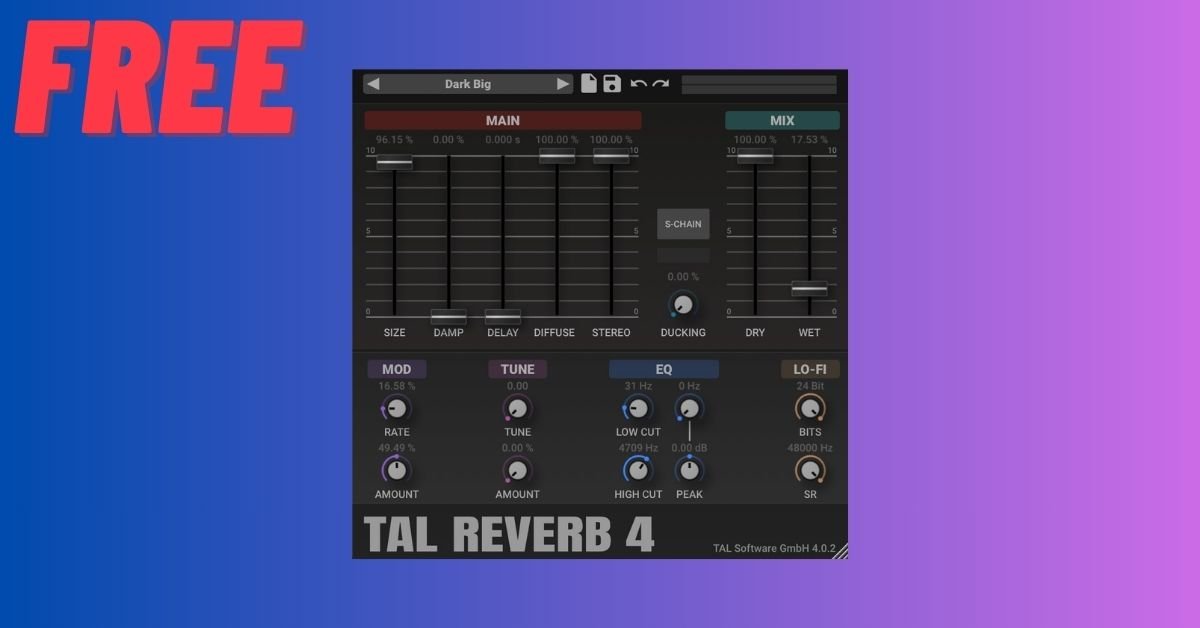
Reverb is one of the most powerful tools in music production. It creates space, depth, and emotion—turning dry sounds into immersive experiences. Among the countless reverb plugins available today, TAL Reverb has built a strong reputation for doing one thing extremely well: delivering smooth, vintage-style ambience with minimal fuss.
If you love warm tails, retro character, and quick workflow, TAL Reverb might be exactly what your mixes need.
What is TAL Reverb?
TAL Reverb is a free reverb plugin developed by Togu Audio Line (TAL), a company known for high-quality, analog-inspired audio tools. Unlike ultra-complex modern reverbs packed with parameters, TAL Reverb focuses on musicality and simplicity.
It’s designed to emulate the character of classic plate and hall reverbs, with a slightly lo-fi, vintage tone that fits beautifully in many genres.
Why Producers Love TAL Reverb
1) Simple, Fast Workflow
TAL Reverb keeps controls minimal. You don’t waste time diving into sub-menus or tweaking dozens of parameters. This makes it ideal for:
Quick idea sketching
Sound design sessions
Producers who prefer ears over visuals
Load it, turn a few knobs, and you’re already in a good place.
2) Warm Vintage Character
TAL Reverb doesn’t aim for ultra-realistic room simulation. Instead, it delivers:
Smooth decay
Slightly dark tone
Musical diffusion
This makes it perfect for vintage vibes, synths, and atmospheric productions.
3) Excellent for Synths & Pads
If you work with:
Analog-style synths
Ambient textures
Lo-fi beats
Retro pop or synthwave
TAL Reverb can glue everything together with a cohesive, nostalgic space.
4) CPU Friendly
Because it’s lightweight, you can run multiple instances without stressing your system. That’s great for large projects or lower-spec setups.
Key Controls Explained
Even with a simple interface, the controls are powerful:
Decay Time
Controls how long the reverb tail lasts. Shorter for tight spaces, longer for dreamy ambience.
Size
Changes the perceived space. Smaller feels intimate; larger feels cinematic.
Diffusion
Affects how dense and smooth the reverb tail is. Higher diffusion = smoother wash.
High Cut
Rolls off high frequencies in the reverb. Great for vintage warmth and preventing harshness.
Wet/Dry Mix
Balances original signal vs reverb. On sends, keep it 100% wet.
Best Use Cases
Vocals
Great for subtle background space or vintage vocal tones. Use short decay and high-cut for a classic feel.
Snare & Drums
Add body and depth without sounding overly digital.
Guitars & Keys
Perfect for lush, dreamy textures.
Lo-Fi & Retro Production
This is where TAL Reverb truly shines.
Pro Tips
✔ Use on a send channel for better control
✔ Combine with delay for wide ambience
✔ Automate decay for transitions
✔ High-cut to keep mixes clean
Final Thoughts
TAL Reverb proves that you don’t need a complex plugin to get great sound. Its charm lies in its simplicity and vintage tone. While it may not replace high-end convolution or algorithmic reverbs for realistic spaces, it excels at musical, character-driven ambience.
If you want a free, reliable, and great-sounding reverb—especially for synths and creative production—TAL Reverb is absolutely worth adding to your toolkit.
Tal Reverb Plugin