
Stone Voices released AM radio simulator plugin For Free
There's a reason your favorite lo-fi records sound the way they do. And now, a free plugin is handing you that secret.
Before streaming, before CDs, before cassette tapes even — there was AM radio. A crackling, drifting, gloriously imperfect signal that somehow made every song it touched feel more alive. More urgent. More human.
Stone Voices has bottled that magic into Retro Radio, a completely free plugin for macOS and Windows that simulates the sound of vintage AM broadcast receivers. And if you write lo-fi, hip-hop, indie, cinematic ambient, or really any music that breathes with character, this might just become one of your most-used effects in the rack.
Why Would You Want to Sound Worse?
That's the question, isn't it?
We spend years chasing clarity — better converters, better preamps, flatter monitoring — and then we slam everything through a plugin that introduces noise, crackle, and frequency roll-off. It sounds contradictory. It isn't.
The truth is that the human ear doesn't equate fidelity with feeling. Some of the most emotionally resonant recordings in history were captured on cheap equipment, broadcast through lo-fi transmitters, and received on tinny speakers perched on kitchen counters. The imperfections weren't bugs. They were texture. They were place and time.
When you run a vocal through something that sounds like a 1950s pocket radio, you're not degrading it — you're contextualising it. You're placing the listener somewhere. And that is one of the most powerful things a producer can do.
What's Actually Inside the Plugin
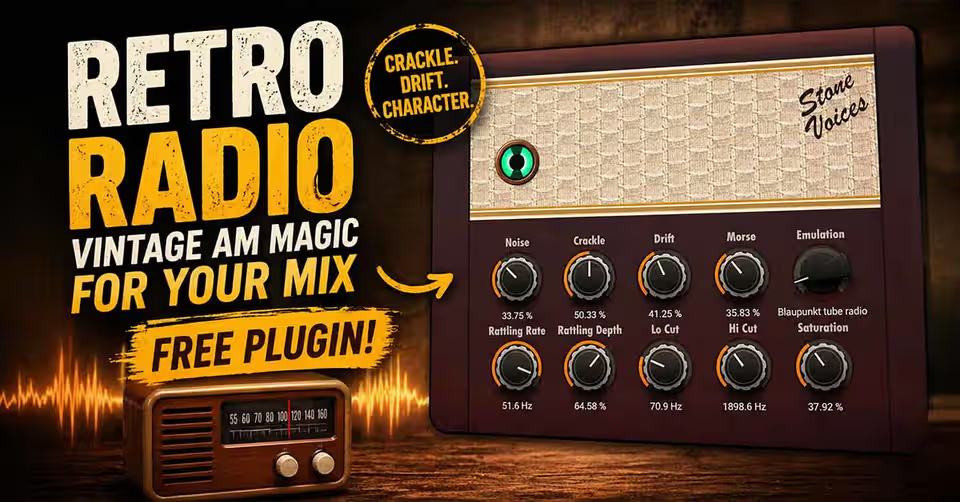
Retro Radio isn't just a low-pass filter with some added noise. The controls on offer paint a much richer picture of the AM radio experience:
Noise & Crackle — The bread and butter of the vintage radio sound. These two controls let you dial in everything from a light static haze to a full-on rain-on-the-receiver texture. Used subtly on a snare or hi-hat bus, they add an organic graininess that no digital plugin can fake.
Drift — This is the one that makes things feel alive. AM radio signals didn't sit perfectly on frequency — they drifted, wobbled, and wandered. The Drift control replicates this subtle pitch and tonal instability, giving your audio that unmistakable sense of being received rather than rendered.
Morse — Possibly the most characterful feature in the entire plugin. Morse code bleed was a genuine phenomenon on AM radio — amateur operators and military broadcasts would occasionally leak into commercial channels. It's a niche detail, but for sound designers and producers working on cinematic or experimental material, this is pure gold.
Rattling Rate & Rattling Depth — Old radio cabinets had loose screws, vibrating grilles, and resonant wooden enclosures. The rattle controls simulate the physical artefacts of the hardware itself — not just the electronics, but the box those electronics lived in. It's a subtle touch that elevates the illusion considerably.
Lo Cut & Hi Cut — AM radio had a narrow frequency response by modern standards, and these filters let you sculpt exactly how narrow. Roll off the lows for that telephone-speaker thinness, or cut the highs for a muffled, distant quality. Used together, they're the foundation of the classic AM sound.
Saturation — Because no vintage circuit was ever truly linear. A little saturation adds harmonic warmth and gentle compression, the kind that analogue circuits produce simply by existing.
And finally, there's a selector dial for choosing between stationary and pocket radio emulation modes — two distinct flavours of the same era.
Five Creative Ways to Use Retro Radio
You don't have to limit this to obvious lo-fi applications. Here's where it gets interesting:
Parallel processing on drums — Send your drum bus to a return, smash it through Retro Radio with heavy crackle and extreme hi-cut, then blend it back in at around 10–15%. The result is a gritty, aged under-layer that makes the kit feel like it was recorded in a different decade — in the best possible way.
Vocal telephone effect — Drop Retro Radio on a vocal, engage both Lo and Hi cut aggressively, add a touch of noise, and you've got a convincing telephone or intercom sound without reaching for a dedicated plugin.
Ambient texture generation — Feed silence — or very quiet room tone — through the plugin with noise and crackle cranked up. You'll generate an evolving AM static texture that works beautifully as a bed under lo-fi tracks or film scores.
Morse code as rhythmic element — The Morse control creates patterns. With some experimentation, you can sync these to your track's tempo and use them as a subtle rhythmic layer — haunting, mysterious, and completely unique.
Automating the Drift — Automate the Drift parameter to increase during specific sections of a track. Imagine a verse sitting clean and then the chorus drifting slightly — like a memory becoming less certain. It's a storytelling tool as much as a sonic one.
A Note on Compatibility
The plugin is available in AU, VST, and VST3 formats, covering macOS 10.12 and later, and Windows 7 and above. Some users have reported inconsistencies in specific DAW configurations, so if you hit any snags, experimenting with the different format versions is worth the effort. The VST3 version tends to be the most stable across modern environments.
The Bigger Picture
Retro Radio arrives at a moment when producers are more nostalgia-hungry than ever. Lo-fi aesthetics have gone from niche internet subculture to mainstream production staple. Shoegaze, dream pop, and vintage soul are all having sustained revivals. Filmmakers and video game composers are increasingly reaching for era-authentic textures.
What Stone Voices has done here is make one of those textures genuinely accessible — not a dumbed-down approximation, but a thoughtfully designed tool with enough depth to be useful at a professional level.
And it's free. Completely, unconditionally free.
In a plugin market where vintage character often carries a premium price tag, that's not a small thing. It's a generous contribution to a community that's always been hungry for ways to make music that feels like something.
Download Retro Radio for free from the given link — available now for macOS and Windows in AU, VST, and VST3 formats.
Have a creative use case for vintage radio-style processing? Drop it in the comments — the more unusual, the better.
Download AM radio Plugin