


Hot Shower Audio bathROOMs: A Free Reverb Plugin Built Around Five Bathrooms
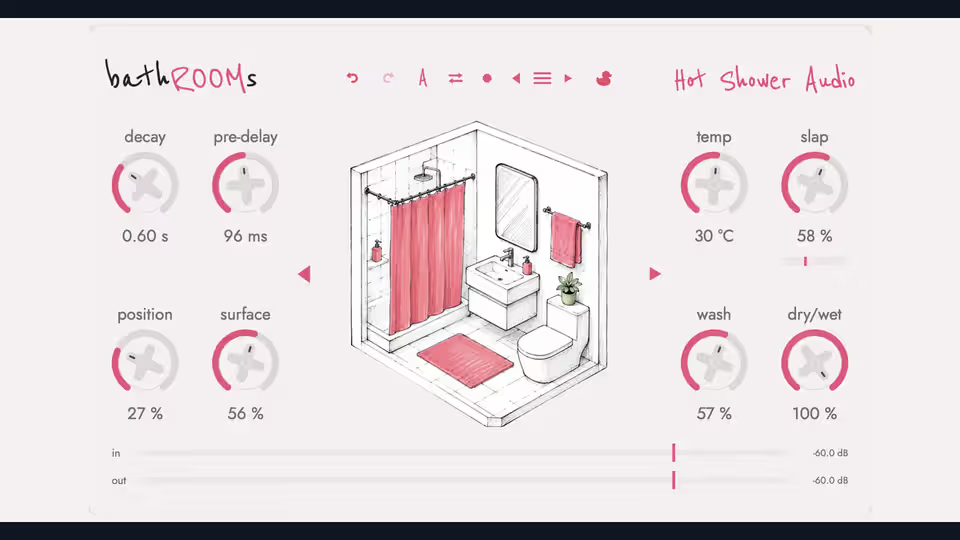
Hot Shower Audio bathROOMs: A Free Reverb Plugin Built Around Five Bathrooms
Reverb plugins usually try to recreate concert halls, studios, chambers, plates, springs, or huge cinematic spaces. Hot Shower Audio has taken a noticeably different approach with bathROOMs — a reverb plugin inspired entirely by bathrooms.
Yes, actual bathrooms.
Released as a pay-what-you-want plugin, including a $0 option, bathROOMs gives producers five distinctive bathroom-inspired spaces and wraps them inside one of the more unusual reverb interfaces we've seen recently. It is available for both macOS and Windows.
But bathROOMs is more than a visual joke. Instead of filling the interface with traditional technical parameters, the developer has designed controls around the physical characteristics of a room.
Five Bathrooms, Five Different Spaces
At the center of bathROOMs are five selectable rooms:
Lavender
Porcelain
Cove
Greenhouse
Baldosa
Each room has a different size, brightness, and reflection character.
Lavender is the smallest and darkest of the collection, while Cove is the largest and most spacious. Porcelain acts as a more balanced middle ground, Greenhouse offers a somewhat larger and livelier space, and Baldosa is small, hard, and designed around brighter reflections.
Instead of staring at abstract algorithm names, you simply choose the type of room that fits the sound you're trying to create.
That makes bathROOMs especially interesting for producers who prefer choosing effects by ear rather than thinking about reverb algorithms.
Position Changes More Than Just Distance
One of bathROOMs' most interesting controls is Position.
Turning it isn't equivalent to simply adjusting a traditional room-size parameter. Hot Shower Audio describes Position as changing several characteristics together.
Move backward and the virtual space becomes darker and narrower. Move forward and it becomes brighter and more open. In other words, the control combines aspects of distance, room perspective, width, and tonal character into a single parameter.
It is a smart approach because these characteristics are normally spread across several controls in a conventional reverb.
For quick mixing sessions, having them connected can make finding a usable space considerably faster.
Surface Lets You Change the Virtual Walls
Bathrooms sound the way they do largely because of their surfaces.
Tiles, glass, porcelain, towels, curtains, and other materials absorb and reflect sound differently.
bathROOMs turns that idea into the Surface control.
At the harder end of the range, the virtual room behaves more like reflective tile or porcelain, allowing more high-frequency energy to bounce around the room.
Move toward softer surfaces and the high frequencies become increasingly absorbed, similar to filling a bathroom with towels, curtains, rugs, and other softer materials.
This can be particularly useful for controlling how aggressively the reverb sits behind vocals or instruments.
Instead of immediately reaching for a separate EQ after the reverb, Surface lets you reshape some of the room's tonal behaviour directly.
Turn the Water Temperature Up
Another unusual parameter is appropriately called Temp.
Rather than displaying frequency values, Temp moves between cold and hot.
Cold settings create a brighter and harder character associated with materials such as tile and glass. Moving toward Hot produces a softer and warmer response.
It is essentially a very musician-friendly way of controlling the tonal mood of the reverb.
For example, you could try colder settings on:
Percussion
Synth plucks
Electronic drums
Sound effects
Warmer settings could work nicely on:
Vocals
Acoustic guitars
Piano
Strings
Pads
Of course, there are no rules here. Part of the appeal of a plugin like bathROOMs is experimenting with combinations that would normally seem unusual.
Wash Controls Reflection Density
The Wash parameter determines how clearly you hear individual reflections compared with a smoother, more diffuse reverb cloud.
At lower values, the character of the virtual walls becomes easier to hear.
Increase Wash and those reflections gradually blend together into a denser reverb texture.
That makes it useful for moving between two very different styles of ambience.
You can create a relatively obvious room effect where the boundaries of the space are noticeable, or push things toward a smoother reverb that sits further behind the original signal.
Slap Recreates Bathroom Wall Reflections
Stand between two hard parallel walls and clap your hands and you'll often hear a short bouncing reflection.
bathROOMs recreates this phenomenon using its Slap section.
It provides an independent feedback-style reflection designed around the sound created when hard surfaces face each other.
This could be particularly interesting on drums, percussion, guitars, synths, or sound-design material where you want something somewhere between room ambience and a short echo.
Used aggressively, it may become part of the effect itself.
Used subtly, it can simply give a sound additional dimension.
Built-In Reverb Ducking
One of the most useful practical features inside bathROOMs is its integrated ducker.
Reverb ducking temporarily reduces the reverb while the dry source is active and allows it to become louder again when the source becomes quieter.
This technique is extremely useful on vocals.
You can keep the words clear while the singer is performing, then allow the reverb tail to expand into the gaps between phrases.
bathROOMs provides four main ducking parameters:
Threshold, Ratio, Attack, and Release.
The ducking system can react to the original signal or an external sidechain source.
That means the plugin can potentially be used for more creative effects as well.
Imagine placing a long bathroom reverb on a synth pad and sidechaining its reverb against a drum track. The room could rhythmically disappear and return around the groove.
Traditional Reverb Controls Are Still Included
Despite the unusual interface, bathROOMs doesn't completely abandon familiar reverb controls.
You still get fundamental parameters such as:
Pre-Delay
Useful for separating the dry sound from the beginning of the reverb.
Decay
Controls how long the reverb continues.
Dry/Wet
Controls the balance between the original source and the processed signal.
The decay range reportedly extends from extremely short spaces all the way to long atmospheric tails, giving the plugin considerably more flexibility than the bathroom concept might initially suggest.
A/B Comparison Makes Tweaking Easier
bathROOMs includes two complete A/B slots, allowing users to compare different configurations quickly.
You can create one room setting, switch to the second slot, make adjustments, and instantly compare the two.
Settings can also be copied between the slots.
Anyone who spends too long deciding whether the previous setting actually sounded better will appreciate this.
The plugin also offers undo and redo functionality, a resizable interface, and dark mode.
Naturally, dark mode is described by the developer as being there for those 2 AM studio sessions.
Presets Are Included
If you don't want to build every reverb from scratch, bathROOMs also includes a selection of presets created with input from engineers and producers.
These provide useful starting points before diving into Position, Surface, Wash, Temp, and Slap yourself.
With a plugin this visually driven, however, experimenting manually is probably half the fun.
Pick a bathroom, move Position, change the walls with Surface, turn up the temperature, and see where you end up.
System Requirements
macOS
bathROOMs supports:
VST3
Audio Units (AU)
AAX
Apple Silicon Macs
Intel Macs
macOS 11.0 or later
The macOS release is signed and notarized by Apple.
Windows
Windows users get:
64-bit VST3
Standalone application
Windows 10 or later support
According to Bedroom Producers Blog, the Windows installer was not yet code-signed at launch, so Microsoft Defender may display a warning during installation.
How Much Does bathROOMs Cost?
Here's perhaps the best part.
bathROOMs is pay-what-you-want, and you can enter $0 to download it for free.
That makes it an easy plugin to recommend trying.
Even producers who already own several premium reverbs may find the unusual room-shaping workflow useful when they want to escape the familiar hall, plate, chamber, and spring combinations.
Who Made bathROOMs?
bathROOMs is the first plugin release from Hot Shower Audio, created by Colombian mix engineer Alejandro Ramírez, also known as Ramalejo. The developer describes himself as a Latin Grammy-credited mix engineer.
The idea behind the plugin came from trying to recreate a particular feeling of physical space that conventional reverbs weren't providing.
Instead of reproducing another traditional reverb interface, the developer built the controls around how someone might actually perceive and modify a physical room.
That philosophy is probably bathROOMs' strongest idea.
Final Thoughts
The plugin market isn't exactly short on reverbs.
There are countless free algorithmic reverbs, convolution processors, vintage recreations, gigantic cinematic spaces, plates, springs, chambers, and experimental effects.
So another conventional reverb would have difficulty standing out.
bathROOMs does stand out.
The five illustrated spaces and controls such as Position, Surface, Temp, Wash, and Slap turn familiar reverb concepts into something much easier to visualize.
More importantly, features such as the integrated sidechain ducker, A/B system, extended decay controls, presets, and standard dry/wet functionality mean the plugin isn't relying entirely on its bathroom joke.
Whether bathROOMs becomes your main reverb will depend on your workflow and taste, but for $0, there's very little reason not to experiment with it.
And who knows?
The perfect vocal reverb might have been hiding in the shower all along.
Download: Hot Shower Audio bathROOMs — Pay What You Want / Free
Supported platforms: Windows and macOS
Formats: VST3, AU, AAX (format availability depends on platform)
Price: Pay what you want, including $0
Featured image
Hot Shower Audio bathROOMs reverb interface and illustrated bathroom controls. Product artwork: Hot Shower Audio. Product/image source.
Product and download reference
Hot Shower Audio bathROOMs: A Free Reverb Plugin Built Around Five Bathrooms — reference at hotshoweraudio.com. Check the destination for current versions, compatibility, licence, price and any registration requirements. A reachable page is not a guarantee that a past offer is still free.
Download Plugin
Size: 10


