


Discover PolyFreq: Dezert Audio’s Free Soviet-Style Analog Synth Plugin
Discover PolyFreq: Dezert Audio’s Free Soviet-Style Analog Synth Plugin
If you’re a synth enthusiast or a music producer with a soft spot for vintage analog sounds, there’s a fresh release that’s bound to pique your interest. Dezert Audio, known for their premium Kontakt instrument Freq-2 crafted from a treasure trove of rare analog synths, has just dropped something different yet equally captivating: PolyFreq, a free analog-modeled synthesizer plugin for macOS and Windows.
Unlike Freq-2, which is a sample-based instrument, PolyFreq is a full-on synthesis engine designed to capture that raw, bold character of Soviet-era analog hardware. It’s a playful nod to the vintage world but wrapped up in a sleek, modern interface that feels both fresh and nostalgic.
A Retro-Futuristic Interface That Grows on You
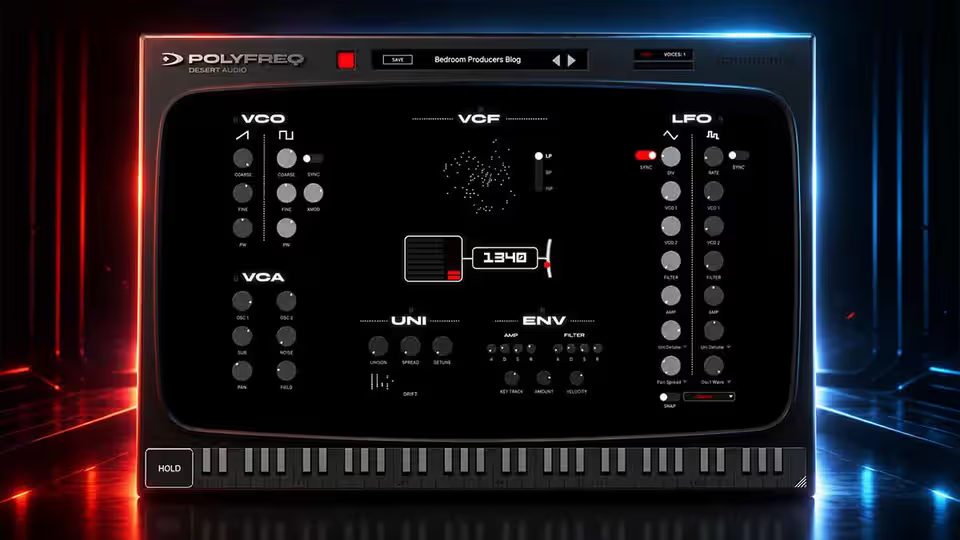
Right from the start, I was drawn to PolyFreq’s interface, especially the filter controls. Instead of the usual round knobs, the cutoff frequency and resonance are set as horizontal bars you adjust by dragging. It’s a bit unconventional but quickly becomes intuitive, giving the synth a retro-futuristic vibe that’s really charming. It’s like stepping into a synth lab from an alternate analog universe.
The Sound: Raw, Bold, and Full of Character
The sound engine taps into the spirit of Soviet synth legends like the Polyvox 18, an early ‘80s beast with a uniquely raw sonic palette. The developer describes the filter as “bold Soviet-style,” and that’s spot on—the sound isn’t polished or overly clean; it’s got grit, bite, and that analog unpredictability that makes things exciting.
Underneath the hood, PolyFreq sports dual oscillators feeding into a nonlinear analog-style filter with three modes—low pass, band pass, and high pass. Saturation and nonlinear responses add authentic analog warmth and instability, mimicking the quirks you’d expect from real vintage gear.
Features That Bring Your Sound to Life
One feature that stood out is the unison mode, which lets you tweak drift, spread, and detune. The drift control, in particular, is fantastic for injecting subtle pitch variations that breathe life into the sound—no more sterile digital precision here.
And if you’re in a creative rut or just looking for some quick inspiration, the handy randomizer button is a game-changer. One click and you get a totally new patch that’s usually more musical than chaotic. After a few tries, I found a glitchy, sync-modulated bass sound that was unpredictably cool and perfect for adding some edge to a track.
Getting PolyFreq and System Requirements
PolyFreq is available as a free download from Dezert Audio’s website. You’ll need to complete a free checkout and create an account to activate the plugin with your email and password. Donations are optional, but it’s a great way to support the developer.
The plugin comes in AU and VST3 formats for macOS (Sequoia 15.7 and above) and VST3 for Windows 10 (64-bit). Note that an internet connection is required for activation on both platforms.
Final Thoughts
If you’re after an analog-style synth with a distinctive vintage flavor and a dash of Soviet-era boldness, PolyFreq is well worth exploring. Its blend of raw character, creative controls, and an engaging interface makes it a fantastic free tool for producers and sound designers alike.
Stay tuned for more exciting synth news and plugin discoveries next week. Until then, happy patching and keep those creative juices flowing!
Product and download reference
Discover PolyFreq: Dezert Audio’s Free Soviet-Style Analog Synth Plugin — reference at www.dezertaudio.com. Check the destination for current versions, compatibility, licence, price and any registration requirements. A reachable page is not a guarantee that a past offer is still free.
Download File


