

Bx solo Plugin For Released for Free
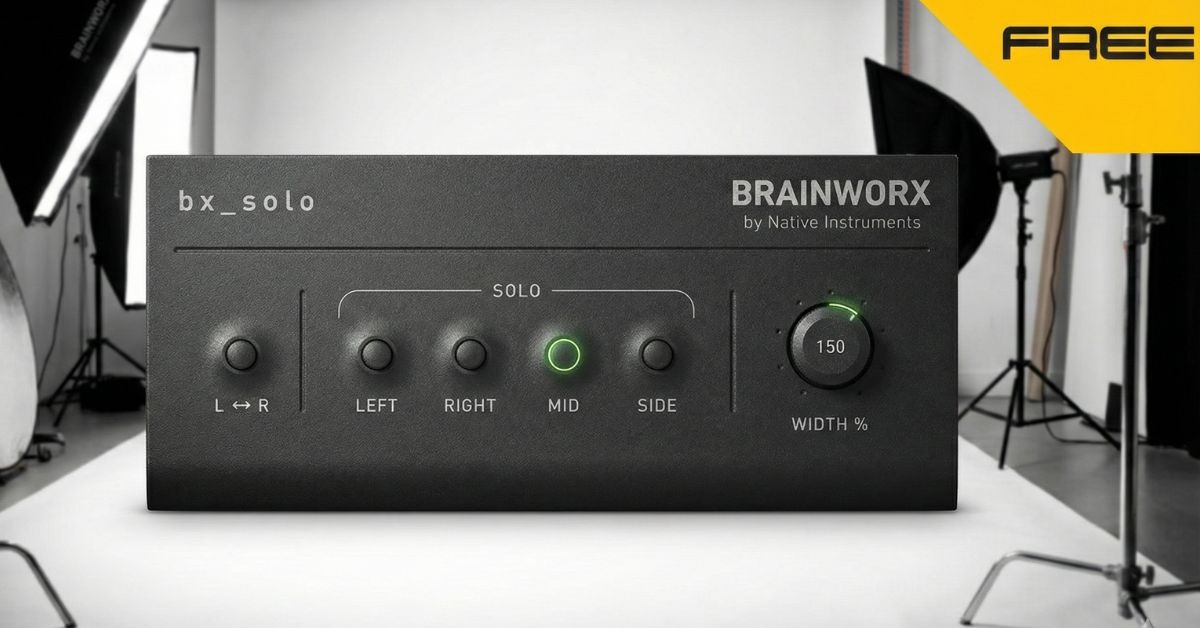
If you’ve ever felt that your stereo mixes sound wide but not clear, or detailed but not focused, you’ve already brushed up against the world of Mid/Side (M/S) processing — whether you realized it or not. The bx_solo plugin by Brainworx is a simple yet surprisingly powerful tool designed to introduce producers and engineers to M/S in a practical, hands-on way.
Rather than overwhelming you with technical complexity, bx_solo acts like a magnifying glass for your stereo field. It lets you hear what’s really happening inside your mix — the center, the sides, and each channel individually. Once you start using it, you may wonder how you mixed without it.
Understanding What You’re Actually Hearing
A stereo track isn’t just “left and right.” It also contains:
Mid (M): The mono sum — everything common to both channels. This is where vocals, bass, kick, and core elements usually live.
Side (S): The stereo difference — the information that creates width, space, and dimension.
Most DAWs don’t make it easy to isolate and monitor these components. That’s where bx_solo shines. Its dedicated Solo buttons let you instantly listen to:
Left channel only
Right channel only
Mid (mono sum)
Side (stereo difference)
This alone can be eye-opening. You might discover a vocal reverb living too much in the center, or background elements cluttering the sides. It’s like turning on the lights in a dim room — suddenly, the details appear.
A Secret Weapon for Mix Checking
Beyond learning M/S, bx_solo is fantastic for quality control.
Clicks, pops, phase issues, and unwanted noise often hide inside stereo content. By soloing the Mid or Side signals, you can quickly pinpoint problems that might go unnoticed in full stereo playback.
For example:
A click might only exist on one channel
A noisy reverb tail might be living mostly in the sides
A phasey synth pad might collapse poorly in mono
bx_solo lets you catch these issues early, before they become mastering headaches.
Playing with Stereo Width
One of the most fun features in bx_solo is the stepped Stereo Width control. It allows you to experiment with widening or narrowing your stereo image using M/S processing.
Try it on:
Guitar buses
Keyboard layers
FX returns
Background vocals
Synth stacks
A classic pro move is widening a rock guitar subgroup to around 150%. The guitars suddenly feel bigger and more exciting, without just turning them up louder. It’s a subtle shift that can make a mix feel “record-ready.”
That said, widening isn’t always better. Overdoing it can introduce phase problems, especially in the low end. bx_solo gives you a safe playground to learn how width affects your mix before committing to heavier processing.
Simple but Workflow-Friendly
bx_solo is built for speed and usability. A few thoughtful features make it easy to integrate into daily work:
Fully automatable controls
Mouse-over adjustment with the scroll wheel
Direct value entry for precise settings
These small touches help you stay in the creative flow instead of fighting the interface.
A Gateway to Advanced M/S Processing
Think of bx_solo as your training ground for Mid/Side. Once you’re comfortable hearing and understanding M/S behavior, moving to more advanced tools becomes much easier.
Higher-end Brainworx processors expand on these concepts with features like low-end mono control to prevent phase issues, more surgical M/S EQ, and deeper stereo manipulation.
But here’s the truth: even experienced engineers keep bx_solo in their toolkit. Not because it’s flashy — but because it’s useful.
Final Thoughts
bx_solo is one of those plugins that quietly improves your mixes without trying to be the star of the show. It teaches your ears, sharpens your decisions, and helps you avoid common stereo mistakes.
If you’re serious about mixing or mastering, understanding your stereo field is non-negotiable. bx_solo makes that learning process simple, practical, and even fun.
Sometimes the best tools aren’t the ones that change your sound — they’re the ones that help you hear it clearly.
bx solo