

APU Spectrum Analyser By APU Software Released For Free
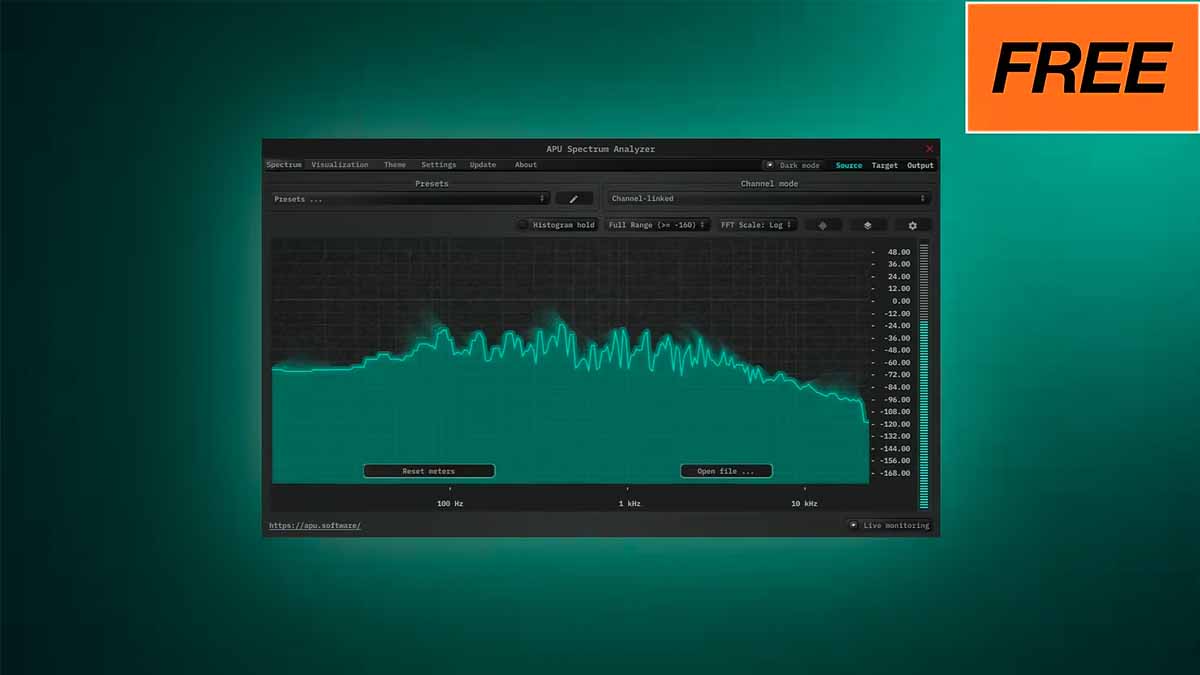
APU Spectrum Analyzer is a powerful free plugin that gives music producers, mixing engineers, and sound designers a clear and flexible view of their audio in the frequency domain. If you are serious about improving your mixes, understanding your low end, or analyzing tonal balance, APU Spectrum Analyzer can become an essential part of your workflow. A good spectrum analyzer helps you see what your ears might miss, and APU Spectrum Analyzer does this with precision and deep customization.
One of the biggest strengths of APU Spectrum Analyzer is its flexible FFT configuration. FFT, or Fast Fourier Transform, determines how detailed and responsive your frequency display is. With APU Spectrum Analyzer, you can choose multiple FFT window types such as Rect, Hann, Hamming, Blackman, and Kaiser. Each window type slightly changes how frequencies are represented, allowing you to tailor the analysis to different tasks like detailed surgical EQ work or general tonal balance checks. The FFT size in APU Spectrum Analyzer ranges from 64 all the way up to 65536, which means you can go from fast, responsive metering to extremely detailed high-resolution analysis.
APU Spectrum Analyzer also excels at real-time monitoring. You can view your spectrum in real time with a variable history size, making it easier to track how frequencies evolve over time. This is especially useful when analyzing dynamic material like vocals, drums, or full mixes. If you want to go deeper, APU Spectrum Analyzer allows you to load external audio files for full spectrum analysis. This makes it useful not only during mixing and mastering, but also for reference track analysis and learning how professional tracks are balanced.
Another reason many producers like APU Spectrum Analyzer is its flexible display options. You can quickly switch between standard dB ranges or use auto-range to keep the display optimized. The frequency spectrum can be viewed in logarithmic, linear, or note-based scales. The note-based scale is particularly helpful for musicians who think in terms of notes and pitches rather than raw frequencies. This makes APU Spectrum Analyzer friendly for both technical engineers and creative musicians.
For long-term analysis, APU Spectrum Analyzer includes a histogram hold feature. This lets you measure long-term frequency response and spot persistent build-ups or gaps in your mix. It is extremely helpful in mastering, where consistent tonal balance matters. You can also adjust the bucket size independently of the FFT size, giving you even more control over how detailed or smooth the display looks. This level of customization is not always available in free tools, which makes APU Spectrum Analyzer stand out.
Snapshots are another practical feature in APU Spectrum Analyzer. You can capture snapshots of a frequency response and use them as references. This is great for comparing your mix to a reference track or checking before-and-after EQ changes. Instead of guessing whether your processing improved the balance, you can visually confirm it using APU Spectrum Analyzer.
Because APU Spectrum Analyzer is free, lightweight, and highly configurable, it fits well into almost any studio setup. Whether you are producing beats, recording vocals, mixing songs, or mastering final tracks, APU Spectrum Analyzer provides reliable visual feedback. While your ears should always be the final judge, a high-quality analyzer like APU Spectrum Analyzer helps you make more informed decisions.
If you are looking for a free spectrum analyzer plugin that offers professional-level control, multiple FFT options, real-time and offline analysis, and flexible display modes, APU Spectrum Analyzer is worth adding to your plugin folder. Consistently using APU Spectrum Analyzer while training your ears can significantly improve your understanding of frequency balance and help you create cleaner, more professional mixes.
Download Free APU Spectrum Analyser